Option 3

Paper Timesheet Instructions

You write your hours on a printed Labour Connect timesheet and your supervisor signs it by hand.

Step 1
Print the paper timesheet
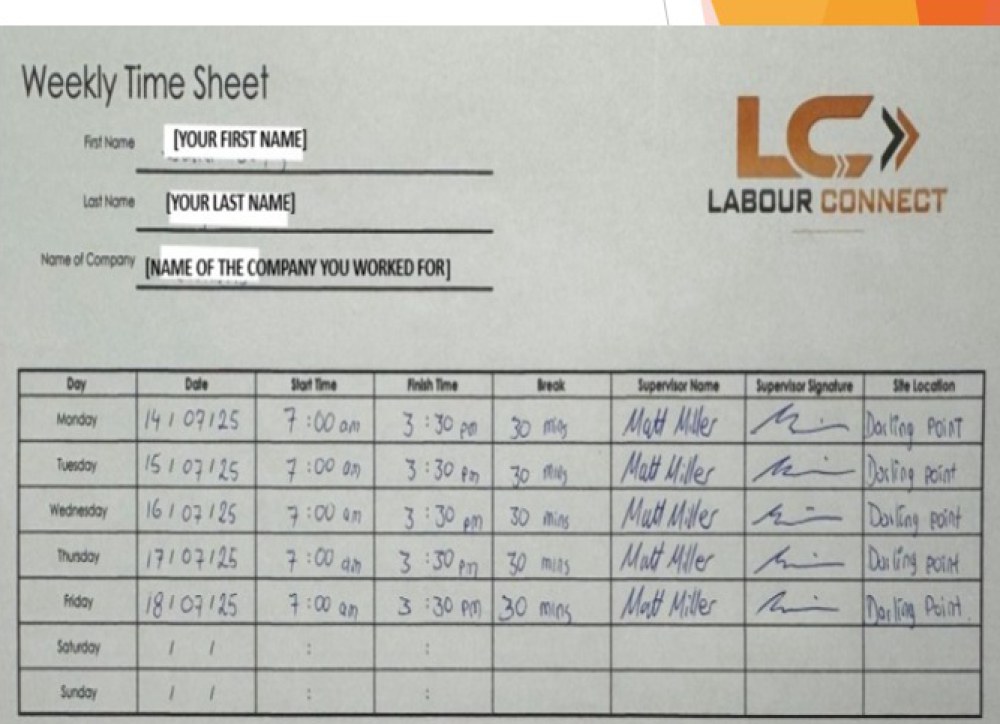
Download it, print it, and copy this example.

This is what a GOOD timesheet looks like

Fill in every box. Copy this example.

Example of a correctly completed Labour Connect timesheet
Step 2: Every shift
Fill it in and get it signed on site
Do this every day you work.
2.1

Write your hours every day

Write the date, start time, finish time and break.

Write the supervisor name and the site location.

Write clearly. If we cannot read it, we cannot pay it.

2.2

Get your supervisor to sign it

Your supervisor must sign the timesheet while you are still on site.

No signature = no pay.

2.3

Use one timesheet for each client

If you work for two clients in the same week, you must fill in two separate timesheets.

Step 3: End of week
Send your timesheet before Sunday 5pm
Email it to your Labour Connect consultant.
3.1

Email it to your consultant

At the end of your working week, take a clear photo or scan of your signed timesheet.

Email it to your Labour Connect consultant before Sunday 5pm.

Send it by email — not by WhatsApp.

Late timesheet = late pay
If your timesheet arrives after Sunday 5pm, your pay moves to the next pay run.
THE RULES
A timesheet that misses any of these may not be paid that week.
  • It must be printed and signed by hand. We do not accept typed timesheets.
  • Fill in every box, for every day you worked.
  • One timesheet for each client.
  • Write clearly.
  • Your supervisor’s name and signature on every day.
  • Send it by email, not WhatsApp.
  • It must arrive before Sunday 5pm.
Are you on the right page?

Make sure you have chosen the correct option.

If you are not sure which option is yours, speak to your Labour Connect consultant.

Need Help?

If you have any problem, contact your Labour Connect consultant, or email us and we will help you.

or call (02) 7205 0105